 InstantToolDeck
JWT Decoder
Paste a JWT to read its header and claims and check whether it has expired. Decoding happens locally.
Free · Runs in your browser · Your text is never uploaded
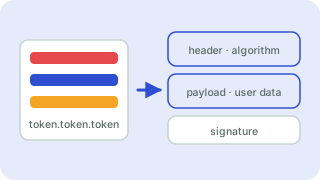
What is inside a JWT?
A JSON Web Token has three Base64URL-encoded parts separated by dots: the header (algorithm and type), the payload (the claims) and the signature. Common claims are iss (issuer), sub (subject), aud (audience), iat (issued at), nbf (not before) and exp (expiry), the last three as Unix timestamps.
Important security notes
- This tool decodes a token; it does not verify the signature. Only your server, with the secret or public key, can do that. Never trust claims you have not verified.
- The payload is readable by anyone who has the token. Do not put secrets in it.
- Treat real tokens as passwords. Decoding here is local, but avoid pasting live production tokens into any tool you do not trust.
Frequently asked questions
Does this verify the JWT signature?
No. It only decodes the header and payload. Signature verification requires the secret or public key and must happen on your server.
Is it safe to paste my token here?
Decoding happens in your browser and the token is never sent to a server. Still, avoid pasting live production tokens anywhere unnecessarily.
How do I know if a JWT has expired?
The tool reads the exp claim and tells you whether the token is expired or still valid, relative to your device’s clock.
Why does my token have only two parts?
Unsecured JWTs (alg “none”) may have an empty signature. The decoder still reads the header and payload.
 Base64 Encoder & Decoder
 JSON Formatter & Validator
 Unix Timestamp Converter
 Hash Generator