 InstantToolDeck
Text Diff Checker
Paste the original text on the left and the changed text on the right to see exactly which lines were added or removed.
Free · Runs in your browser · Your text is never uploaded
How the comparison works
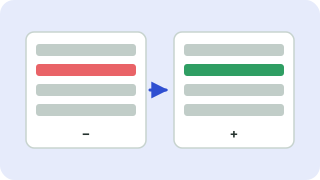
The tool compares the two texts line by line and finds the longest sequence of lines they share, the same idea behind diff and Git. Lines only in the original are marked with a red minus, lines only in the changed text with a green plus, and shared lines are left plain.
Good uses
- Checking what changed between two drafts of a document or contract clause.
- Comparing configuration files, SQL queries or API responses.
- Verifying that a find-and-replace changed only what you intended.
Ignore options help when differences are only formatting: capitalization or extra spaces. Your text is compared locally and never uploaded.
Frequently asked questions
How do I compare two texts for differences?
Paste one version in each box. Added lines show in green, removed lines in red, and the counts appear above.
Does it compare line by line or word by word?
Line by line. If you need word-level changes, put each sentence or word on its own line first.
Is my text private?
Yes. The comparison runs in your browser and nothing is sent to a server.
Is there a size limit?
It handles thousands of lines. Texts that differ in more than about 4,000 lines each may be too large to compare in the browser.
 Remove Duplicate Lines
 Sort Lines
 Text Cleaner
 JSON Formatter & Validator