Hex Calculator
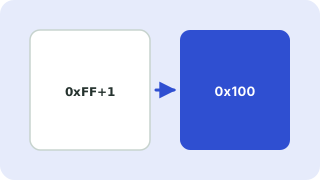
Type an expression such as 0xFF + 0x10 * 2 and get the answer in hexadecimal, decimal, binary and octal.
Free · Runs in your browser · Your text is never uploaded
Supported operators
| Operator | Meaning | Example |
|---|---|---|
+ - * / % | Add, subtract, multiply, divide (whole number), remainder | 0xFF % 0x10 = F |
** | Power | 2 ** 8 in decimal mode = 256 |
& | ^ ~ | Bitwise AND, OR, XOR, NOT | FF & 0F = F |
<< >> | Shift left or right | 1 << 8 = 100 |
( ) | Grouping | (A + B) * 2 = 2A |
How numbers are read
In hexadecimal mode, bare numbers like FF are read as hex and 0x is optional. In the other modes the prefixes 0x, 0b and 0o switch base for a single number, so 10 + 0xA works in decimal mode. Operators follow the usual precedence from C and JavaScript, with ^ meaning XOR, not power.
Whole numbers only
Division drops the remainder (7 / 2 is 3) and negative results show a minus sign instead of two’s complement. Arithmetic is exact, so very large values do not lose precision.
Everything runs in your browser. Nothing you paste is uploaded, logged or stored, so it is safe to use with private data.
Related guides
Popular hex calculator presets
Frequently asked questions
How do I add two hex numbers?
Type them with a plus sign, for example 1A + 2F, and the sum appears in hex, decimal and binary.
How do I do a bitwise AND in hex?
Use the & operator, for example FF & 0F gives F.
Can I mix hex and decimal?
Switch the default base to decimal and put 0x before the hex numbers, such as 10 + 0xFF.
What does ^ do?
It is bitwise XOR, as in most programming languages. Use ** for powers.
Related tools
 Number Base ConverterConvert binary, octal, decimal and hex
 Text to Binary ConverterConvert text to binary, hex or decimal and back
 Color ConverterConvert HEX, RGB, HSL, HSV and CMYK colors
 Hash GeneratorMD5, SHA-1, SHA-256 and SHA-512 hashes
- Hex Addition CalculatorAdd hexadecimal numbers online and see the sum in hex, decimal and binary
- Bitwise CalculatorCalculate bitwise AND, OR, XOR, NOT and bit shifts online